How to serve Markdown versions of WordPress posts
Give every WordPress post a clean Markdown version at /post-slug.md, then verify the endpoint returns real Markdown.
Last updated October 15, 2026
By the end of this page every published post on your site will also answer at a .md address, returning clean Markdown with YAML frontmatter instead of a full HTML page, and you will know how to confirm it.
Why a Markdown version
A rendered WordPress page is mostly not the article. It is the theme, the menu, the sidebar, the cookie banner, the share buttons, the related posts block, plus the scripts and styles that make all of it work. Anything reading that page for the text has to find the text first.
A Markdown version skips the problem. The heading structure survives, lists stay lists, links stay links, and the payload is a fraction of the size. The file also opens with YAML frontmatter, a small metadata block at the top of the document, so basic details about the post travel with the content rather than being buried in tags.
The two addresses RankReady adds
| URL | What it serves |
|---|---|
/{post-slug}.md |
Any single post or page as Markdown |
/index.md |
Your homepage as Markdown |
The homepage gets its own name because appending .md to a bare domain does not produce a path. It produces a different domain, since .md is a real country code top level domain. /index.md avoids that entirely.
The rule that matters most
Distinct .md URLs always serve Markdown, regardless of what the Accept header asks for. This is deliberate, and the reason is cache safety.
A shared cache stores a response against a URL. If one URL could return two different bodies depending on a request header, every layer in front of your site has to be told about that, and any layer that has not been told will happily serve the wrong body to the wrong client. Keeping .md URLs single purpose removes the question. One address, one representation, safe to cache anywhere.
Content negotiation still exists in RankReady, but it happens on the canonical URL, not here. Ask the canonical URL for text/markdown and you get Markdown. Ask for text/html and you get HTML. Ask for something it cannot serve and you get a 406. That is covered in the page on Accept header negotiation.
Same-URL negotiation is its own setting. On new installs it is off until you tick Same-URL content negotiation in the same Markdown subtab. Sites that upgraded from an older version keep it on. The .md addresses work either way.
What ends up in the Markdown, and how it stays current
Dynamic blocks are included. These are blocks WordPress builds when the page loads rather than saving into the post. RankReady renders them as a logged out visitor would see them and puts the result in the Markdown. It does this when the Markdown is built, not on every request.
A page made only of RankReady blocks, such as a landing page that holds an AI summary and an FAQ block, now returns 200 with a title and frontmatter. Before 1.4.1 it returned a 404. A page with no content at all still returns a 404.
Each post keeps its own cache version. When you edit a post, RankReady moves that post to a new version, so the next request builds fresh Markdown instead of serving a stored copy. You do not need to clear anything inside RankReady. This works on every object cache backend.
Developers have two filters for this: rankready_md_watched_meta_keys adds custom fields whose changes should refresh the Markdown, and rankready_md_cache_salt adds your own value to the cache key.
The response is sent with a public Cache-Control of one hour by default. A CDN in front of the site can therefore hold a copy for up to an hour after an edit. If you need a change visible sooner, purge that one URL at the CDN.
When Content Signals are switched on, the Markdown response also carries a Content-Signal header with the same ai-train, search and ai-input values as your robots.txt. A client that only fetched the .md file still sees your policy. The header is absent when Content Signals are off.
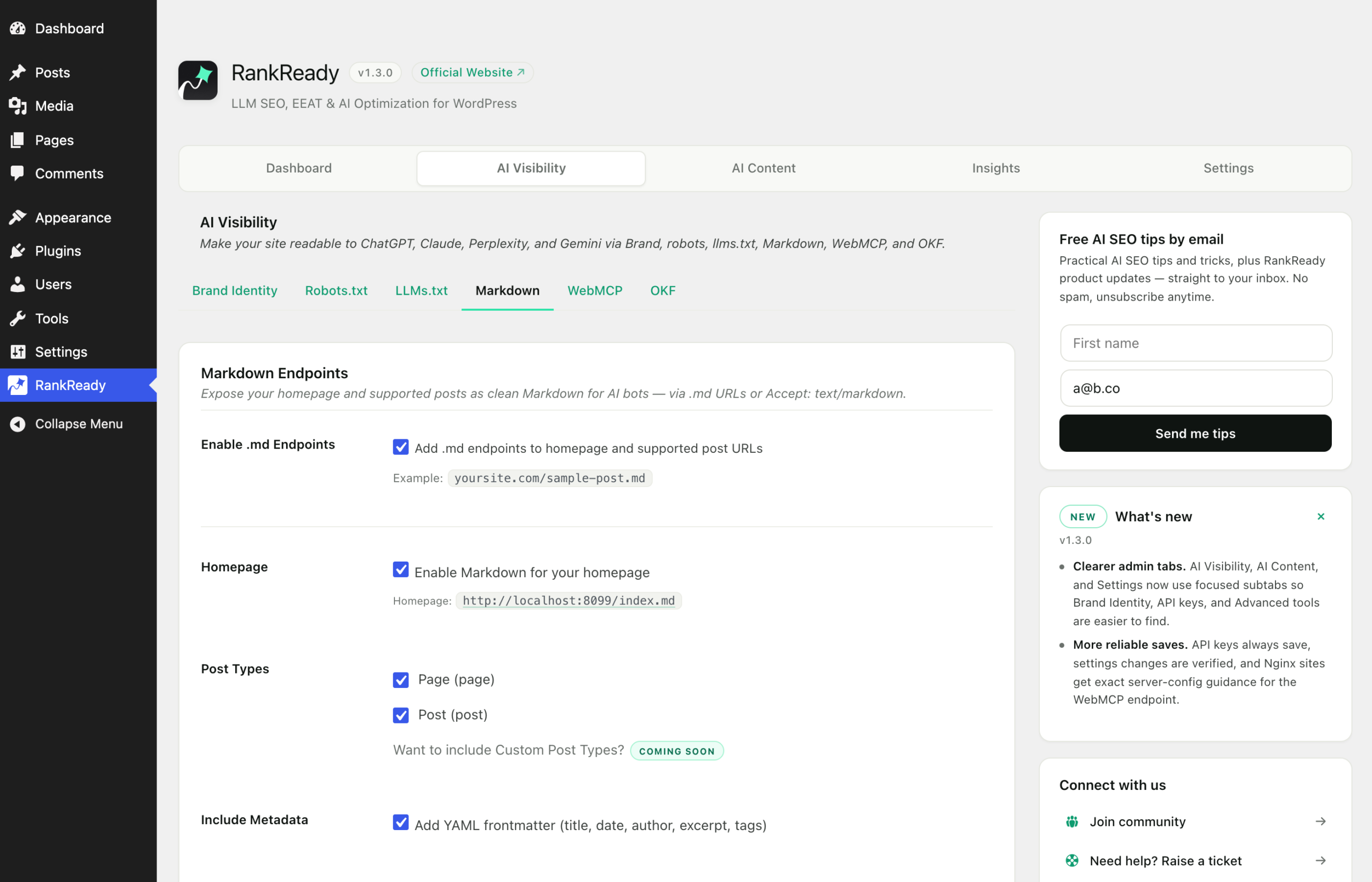
Turn it on in RankReady
- In wp-admin, open RankReady.
- Go to the AI Visibility tab. The address ends in
tab=crawlers. - Open the Markdown subtab,
sub=markdown. - Switch the feature on and save.
No AI provider key is needed. The Markdown is converted from content already in your database. Provider keys in RankReady are used only by AI Summaries and the FAQ Generator.
Verify it worked
Pick a real post slug. Do not invent one, because a made up slug returns a 404 and you will spend an hour debugging a URL that never existed. If you already serve /llms.txt, copy a link out of it.
curl -sI https://your-site.com/your-post-slug.mdA correct response is HTTP/2 200 with a Markdown content type. Now read the body:
curl -s https://your-site.com/your-post-slug.md | head -25You should see a YAML frontmatter block at the very top, delimited by three dashes on their own line, then the post body as Markdown. Headings appear as ## rather than <h2>. There should be no theme markup, no navigation and no scripts.
If Content Signals are on, the same response carries your policy as a header:
curl -sI https://your-site.com/your-post-slug.md | grep -i content-signalCheck the homepage separately, since it uses the other address:
curl -sI https://your-site.com/index.mdThen confirm the cache safety rule holds. Ask the .md URL for HTML on purpose:
curl -s -H 'Accept: text/html' https://your-site.com/your-post-slug.md | head -5You should still get Markdown. That is correct behaviour, not a bug. The .md URL ignores Accept by design.
Compare the payloads
Worth doing once, because it makes the point better than any explanation:
curl -s https://your-site.com/your-post-slug/ | wc -c
curl -s https://your-site.com/your-post-slug.md | wc -c
The first number is the full page including theme markup. The second is the article. Use your own numbers when you talk about this, not anybody else’s.
If a .md URL returns 404
- Confirm the slug exists by loading the normal post URL first.
- Go to Settings, Permalinks and click Save Changes. This rebuilds rewrite rules and resolves most cases.
- Clear any page cache or CDN, then retry.
Some stacks intercept rewrite rules before RankReady sees them, LiteSpeed with Rank Math being the reported combination. RankReady added a raw request path fallback for that, so check you are on the current version.
An honest note on reach
Serving Markdown makes your content available in a clean form. It does not make anything read it, and a request in your logs proves only that the file was fetched. Publish it because it is cheap and correct, not because of any outcome someone promised you.