
The plugin
Installs in wp-admin. Holds the Cloudflare connection, the deploy button, the security switches and the redirect from raw WordPress URLs to the new frontend. GPL-2.0-or-later.
wp-content/plugins/hatch-connect Free plugin GPL-2.0-or-later, no Hatch account
Hatch is a free WordPress plugin. It deploys an Astro frontend to a Cloudflare Worker in your own account and reads your content over a REST API. You keep writing in WordPress with the block editor.
Same block editor, same plugins, same team.
One Cloudflare API token. The Astro frontend lands in your own Cloudflare account.
A WordPress plugin with three parts. You install it, paste one Cloudflare API token, and your site is served by an Astro frontend instead of PHP.
Installs in wp-admin. Holds the Cloudflare connection, the deploy button, the security switches and the redirect from raw WordPress URLs to the new frontend. GPL-2.0-or-later.
wp-content/plugins/hatch-connectA read API at hatch/v1. The frontend asks it for posts, pages, menus and your SEO plugin meta. WordPress still holds all of it.
GET /wp-json/hatch/v1/…Rendered on a Cloudflare Worker in your own account, with an edge cache in front. Pick a starter: Editorial, Terminal or Docs. It is plain code you can edit.
Astro · Cloudflare WorkersHeadless means the system you write in and the system that serves visitors are two different things. Your content, editor and plugins stay in WordPress. Only the part that builds each page changes.
Your team already knows the editor. Rank Math or Yoast, Fluent Forms, WooCommerce and ACF keep doing their jobs. Nothing is migrated, so there is no content model to rebuild.
Astro renders HTML on the server and ships no JavaScript framework to visitors unless a component asks for it. The starters are plain files, so a developer or an AI can restyle them while the content stays in WordPress.
Get the best of Astro while still managing your content with the WordPress you already know and love.
You keep writing in WordPress with the block editor. Your readers see the Astro visitor site, which Hatch builds from your WordPress content.
New posts appear shortly after you publish them. By default, each page is saved for one minute. After that, a visitor can still see the saved copy for up to an hour while Hatch refreshes it in the background.
| WordPress | 45% |
|---|
Core Web Vitals are Google's scores for speed and stability, measured on real visitors' devices. In the HTTP Archive Web Almanac 2025, WordPress sites had a 45% pass rate on mobile. The same chapter says self-hosted CMSs show much wider variance, influenced by themes, plugins and third-party integrations.
Source: HTTP Archive Web Almanac 2025, CMS chapter (published 2026-01-15)
We do not have a sourced Astro pass rate yet, so this shows the WordPress baseline only.
WordPress exposes your content. An Astro frontend renders it. Cloudflare serves it from your own account.
Hatch adds a hatch/v1 REST namespace that carries posts, pages, menus, search data, custom post types and block output. The frontend reads through a Subscriber account you create, never your admin login.
A modern Astro frontend turns that data into a modern site. Pick Editorial, Terminal or Docs. No WordPress plugin CSS or JavaScript ships to the visitor.
The Worker is uploaded to your own Cloudflare account. A visit is answered by Cloudflare, and WordPress is only asked again when you publish or refresh.
Three ready-made designs: Editorial for blogs, Terminal for technical sites, Docs for help centres.
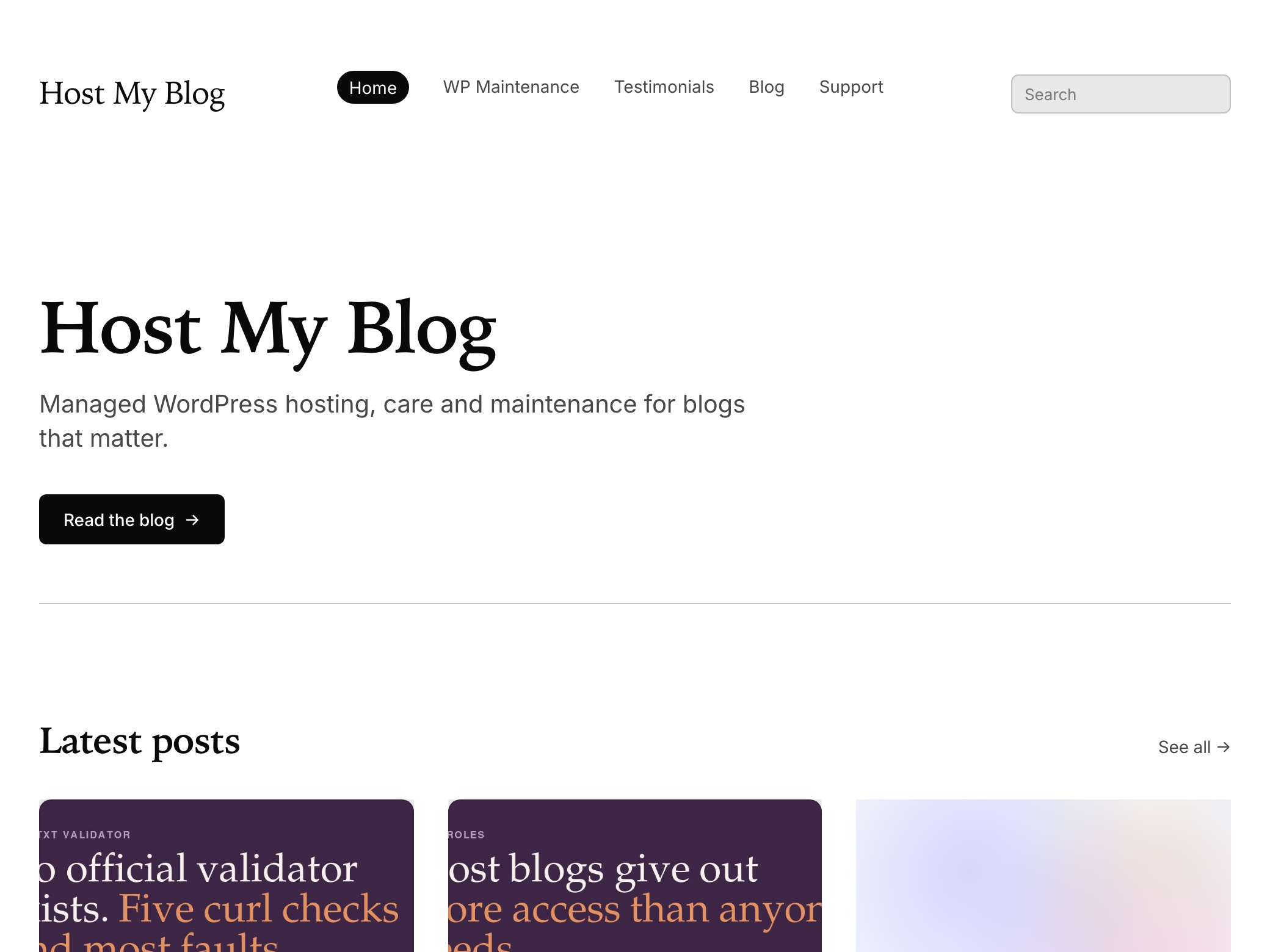
For blogs and publications. Blog index, categories, tags and author pages.
View live demo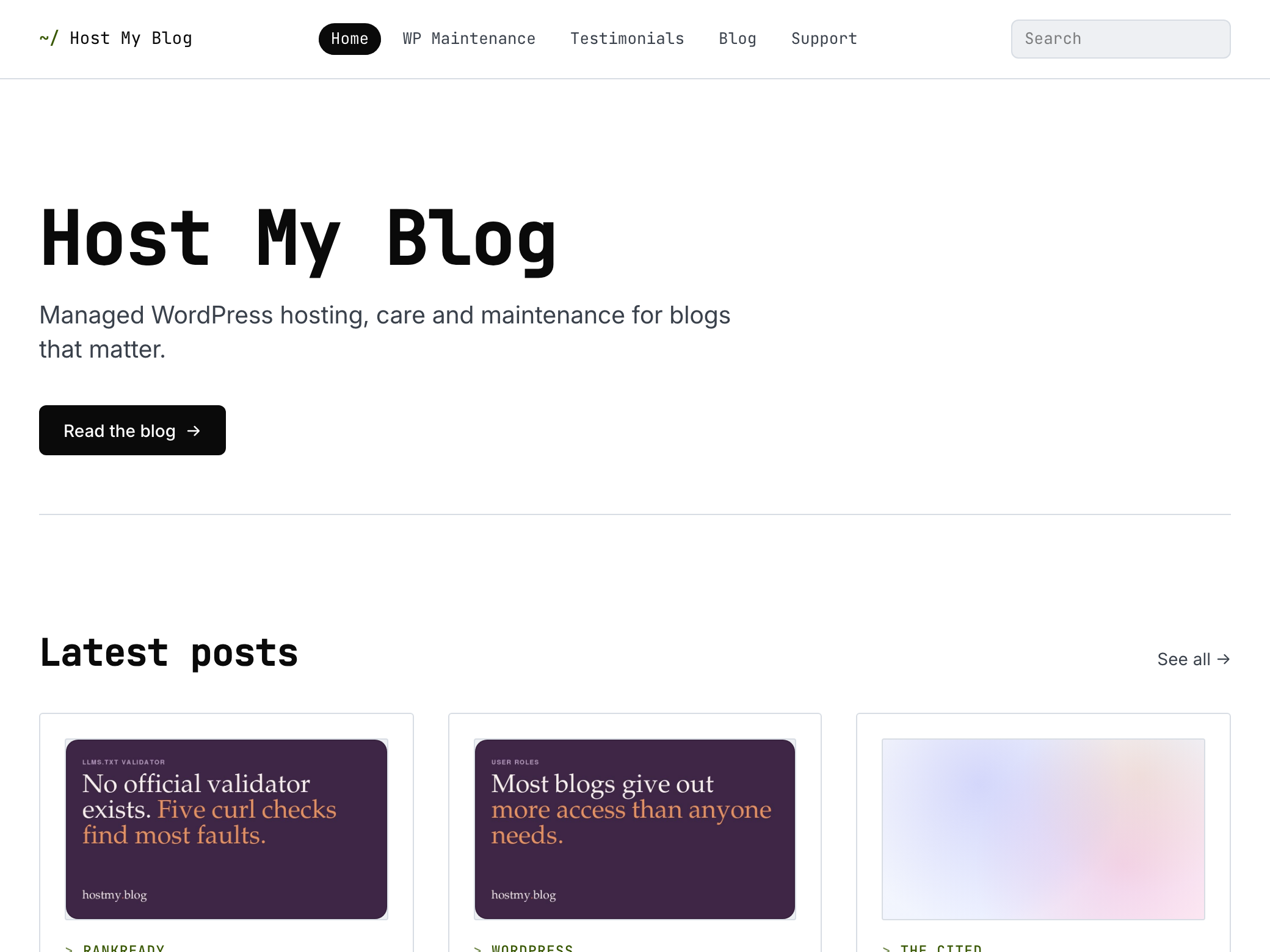
For developer and technical sites. The same content with a command-line feel.
View live demo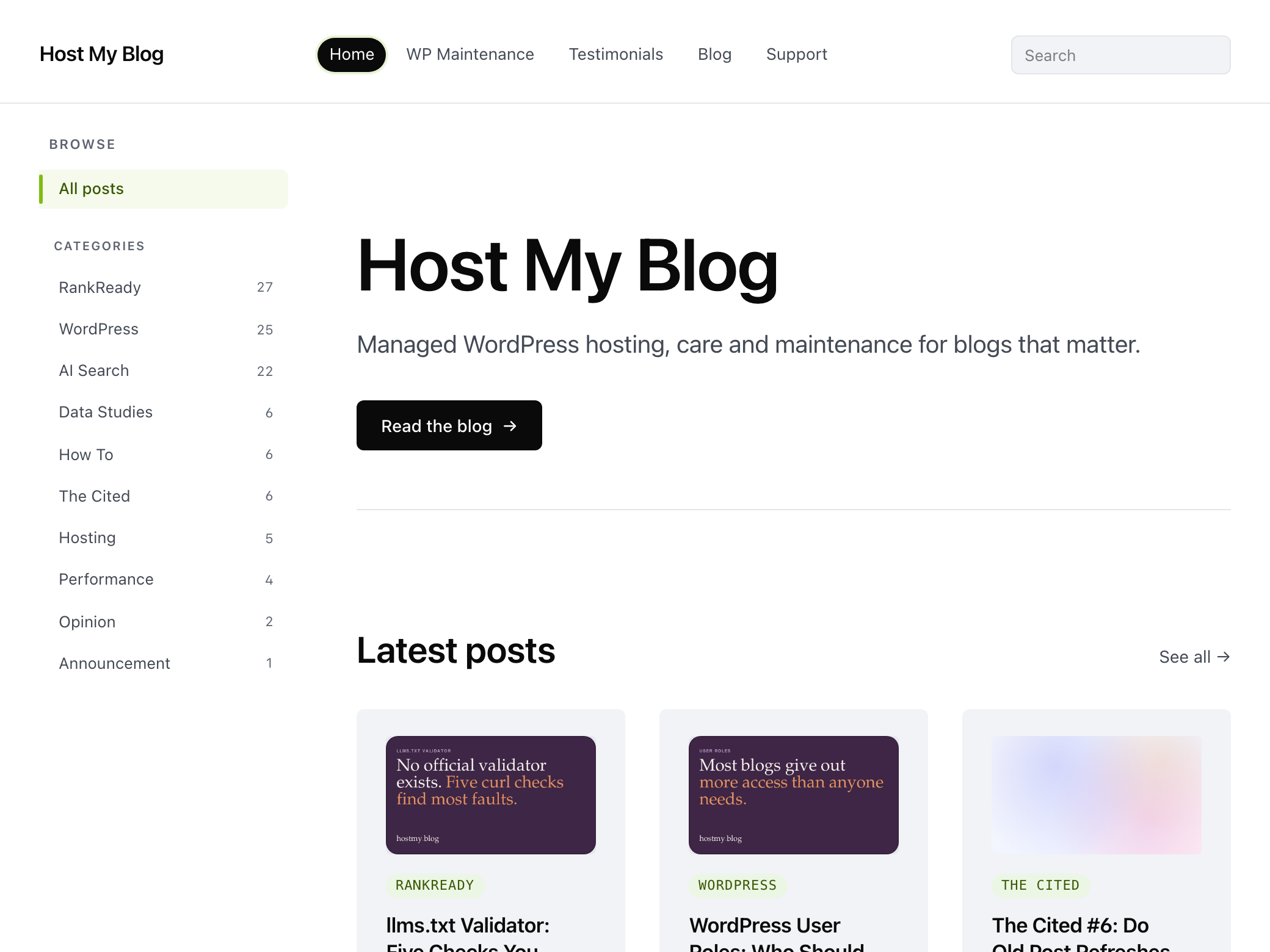
For documentation and help centres. A sidebar keeps every page one click away.
View live demoHatch supports 36 WordPress core blocks on the Astro visitor site. Write with the block editor as you do now. The visitor site shows each supported block with Hatch's styles.
Blocks outside this list: Hatch does not style them. The visitor site shows their saved HTML as WordPress stored it, without Hatch styles. Query Loop is not on the list, so check those pages on the visitor site before you switch.
Block limit (optional): A setting limits the editor to the supported blocks. It is off by default.
Visitors read pages from the Astro visitor site. If someone opens a public WordPress post or page address, Hatch sends them to the same path on the visitor site.
Hatch does not firewall your WordPress. Login, the admin area, the REST API, feeds, sitemaps and previews are not redirected, so those addresses still answer on your server. The security switches are separate. Each one blocks or changes one specific thing, listed below.
Visitors read pages from the Astro visitor site.
Login, the admin area, the REST API, feeds, sitemaps and previews still answer on your server.
/xmlrpc.php are refused with a 403 response.Fortress Mode is one master switch. It turns on seven switches at once: XML-RPC, usernames, code editors and updates, changes without an Application Password, security headers, the WordPress version and folder listings.
The plugin handles the connection, reads the plugins you already use, locks WordPress down and ships a frontend you can start from.
The Worker is uploaded to your account with one API token. The free Cloudflare plan includes Workers, and Hatch itself has no fees.
The frontend reads your content through a Subscriber account with an Application Password that you create, not an admin account.
Publish or update a post in WordPress and Hatch refreshes the frontend. You can also refresh the cache by hand.
One screen shows whether WordPress, the REST bridge and your Cloudflare deployment are talking to each other.
Turn off emoji scripts, embeds, XML-RPC, head clutter, block CSS, jQuery Migrate, the public user list, self-pingbacks and feeds.
Not sure? Press Disconnect in the Connection tab. The Worker stays in Cloudflare until you delete it there.
Nothing on your site or in your Cloudflare account changes until you press Deploy. Disconnect undoes it.
In your Cloudflare dashboard, create an API token with the permission Account, Workers Scripts, Edit. A custom domain also needs Zone Read and Workers Routes Edit.
Open the Connection tab, paste the token and choose a workers.dev address or your own domain. Tick the consent box that lists the changes.
Hatch uploads the frontend to your Cloudflare account. From then on, publishing in WordPress refreshes the site automatically.
Created in your Cloudflare dashboard.
The token is encrypted and never shown again.
Then keep writing. Publishing refreshes the site.
Illustration of the three steps. Exact screens may differ.
Version one deploys to Cloudflare from the plugin screen. Netlify, Vercel and Spacefast are planned, no date.

Hatch uploads the frontend to your own Cloudflare account as a Worker. This is the deploy in version one.

The same frontend, deployed to your Netlify account.

The same frontend, deployed to your Vercel account.

The same frontend, published to Spacefast.
Your plugins stay installed and keep working in WordPress. Hatch bridges each category to the frontend.
Your SEO plugin’s meta tags and schema are passed to the frontend. Redirects set in Rank Math or Redirection are read too.
Forms stay in WordPress. The frontend shows the form and sends each submission back to WordPress. Cloudflare Turnstile is optional.
Products, variations, categories and featured items come through hatch/v1. Guests can look up an order with its key. Stripe and PayPal fields appear at checkout when you switch them on in your WooCommerce settings.
Approved comments are listed on the frontend, and new ones go through normal WordPress moderation. Sign-in uses a 24-hour JWT with a per-IP rate limit and a honeypot.
These plugins ship their own REST support. Hatch checks that your field groups and custom post types are not hidden from it, and warns you if they are.
Our own plugin. Hatch reads RankReady’s headless settings, so /llms.txt and /.well-known/mcp.json are served by the frontend and its summary and FAQ schema reach your pages.
This list grows with the plugin. A plugin appears here once Hatch has a bridge for it.
They are real answers when you start fresh. If your content already lives in WordPress, you would be paying to rebuild what you have.
Every major headless WordPress approach has a deal-breaker for real teams. Here is the honest picture.
| What you need |  hatch | Faust.js | Next.js + WPGraphQL | Gatsby + WP |
|---|---|---|---|---|
| Set up from WP admin | Yes | No | No | No |
| Publish in wp-admin, live without a rebuild | Yes. Server-rendered behind an edge cache: 60 seconds fresh, up to an hour stale while it refreshes | ISR | ISR or SSR | No. Static rebuild of the whole site |
| Gutenberg blocks reach the frontend | Yes. Block output over REST | Partial | Developer work | Developer work |
| ACF or Meta Box fields | Yes, over REST. Hatch warns if a field group is hidden from it | Via WPGraphQL | Via WPGraphQL | Via WPGraphQL |
| Starter designs included | 3: Editorial, Terminal, Docs | None. You build the UI | None. You build the UI | None. You build the UI |
| No WPGraphQL plugin required | Yes. REST only | Required | Required | Required |
| Security hardening built in | Yes. Closes XML-RPC, hides the user list, limits logins | DIY | DIY | DIY |
| Where the frontend runs | Cloudflare Workers today. Netlify, Vercel and Spacefast are planned, no date | WP Engine focus | Vercel or a Node host you run | A static host you choose |
| Who sets it up | You, from wp-admin | A developer | A developer | A developer |
| Cost | Free and open source. The free Cloudflare plan includes Workers | Free software, plus hosting and developer time | Free software, plus hosting and developer time | Free software, plus hosting and developer time |
Frontity is excluded: the project was archived in February 2025. Faust.js details come from faustjs.org. ISR is Incremental Static Regeneration, which rebuilds on a schedule rather than on publish. Compared on 27 October 2026; check each project before you decide.
The other headless WordPress approaches need the WPGraphQL plugin. Hatch reads the native REST API, so there is less to install and less to keep updated.
Static-site tools rebuild the site when you publish. Hatch renders on request behind an edge cache, so there is no build to wait for.
Faust.js and a custom Next.js stack ship with no UI. Hatch includes three Astro starters (Editorial, Terminal and Docs) that you can edit as plain code.
Paste one Cloudflare token and press Deploy. A consent box lists every change before anything happens. The other stacks start with a developer and a data layer.
Everything the Astro starters use is a plain hatch/v1 REST endpoint. Build your own frontend on it if you prefer.
Posts, pages, menus, search data, custom post types and block output, all over hatch/v1. It works with any frontend.
You create a Subscriber account and an Application Password in WordPress. Hatch refuses any account that can edit other people's posts or manage the site. Your admin login is never used.
The auth endpoint issues a JWT valid for 24 hours, with a per-IP rate limit and a honeypot.
GET /hatch/v1/features GET /hatch/v1/content?slug= GET /hatch/v1/menus/{location} GET /hatch/v1/seo-head GET /hatch/v1/schema POST /hatch/v1/auth/login
Better you know before you install it.
The good match
The honest limits
Every conversation about a hard-to-manage WordPress site ended the same way: a caching plugin, a CDN plugin, a few support tickets, and the same worries a month later.
We wanted WordPress to stay modern without making anyone leave what they know. Developers should not have to run two stacks.
Security is the other half. When visitors are served from Cloudflare, WordPress no longer has to be the public face of your site, and the Security tab lets you close the doors visitors do not need.
Hatch is free and GPL because the people who need it most are freelancers and small teams building sites for clients.
The Hatch team
A fair way to work when the site is only yours. It gets harder when someone else has to keep it running. Here is the same site, six months on.
A scenario, not a benchmark.
WordPress 6.4 or newer, PHP 7.4 or newer, and a site reachable over HTTPS. A free Cloudflare account is enough. Nothing else to buy.
No. Your content stays in WordPress and you keep writing in the block editor. Your theme stays installed. Visitors who land on a raw WordPress URL are sent to the new frontend, which reads your content over the REST API, while wp-admin, wp-login, the REST API, feeds, sitemaps and previews are never redirected.
Nothing on your site or in your Cloudflare account changes until you press Deploy, and the consent box lists the changes before you tick it. Hatch uploads the frontend as a Worker to your Cloudflare account and does not create users or passwords: you create the Subscriber account and Application Password for the frontend yourself. Permalinks change to /%postname%/ only if you tick that option. Disconnect undoes it.
The token is encrypted, never shown again and never logged. There is no Hatch server, account or hosted deploy service in the middle: the Worker is uploaded straight to your own Cloudflare account.
They stay on your WordPress site. The frontend talks to WordPress for all three, and Cloudflare Turnstile is optional.
Rank Math and Yoast for SEO, Fluent Forms, WPForms, Contact Form 7 and Gravity Forms for forms, WooCommerce for stores, and RankReady. ACF, Secure Custom Fields, Meta Box and Pods field groups are checked for REST visibility. Your SEO plugin meta is passed to the frontend.
Not in version one. Cloudflare only. Netlify, Vercel and Spacefast are planned, no date. The hatch/v1 REST API works with any frontend if you want to build your own.
Hatch itself has no fees. The free Cloudflare plan includes Workers, which is what Hatch deploys to.
Hatch makes no ranking or citation promise. It passes your SEO plugin meta to the frontend. Results still depend on your content.
Yes. The plugin is GPL-2.0-or-later. Start from one of the three starter designs: Editorial, Terminal or Docs.
Keep the editor you know. Hatch puts an Astro frontend in front of it, and one button takes it back off.