How to make your first post AI-ready
Take one published post from plain HTML to Markdown, a summary, FAQs and Article schema, in the right order.
Last updated September 27, 2026
Pick one published post and work through this page. At the end that post will be available as clean Markdown, listed in your llms.txt, carrying a generated summary and FAQ, and emitting Article schema. The order matters, so do not skip ahead.
Step 1: Start with a post that is already published
Use a real published post, not a draft. Several outputs read from published content, so a draft gives you a confusing half result.
You do not need to rewrite the post. RankReady does not change your post body. It reads what is there and publishes machine-readable versions alongside it.

Step 2: Confirm the Markdown version exists
With the Markdown feature on (AI Visibility, sub=markdown), every post is available at /{post-slug}.md. Open that URL for your chosen post.
You should get clean Markdown with YAML frontmatter at the top. This URL always serves Markdown no matter what Accept header the client sends, which makes it safe to cache and safe to link to.
If it returns 404, go to Settings, Permalinks and click Save Changes once to regenerate rewrite rules. That resolves stale rules, which is the usual cause.
Step 3: Generate the AI summary
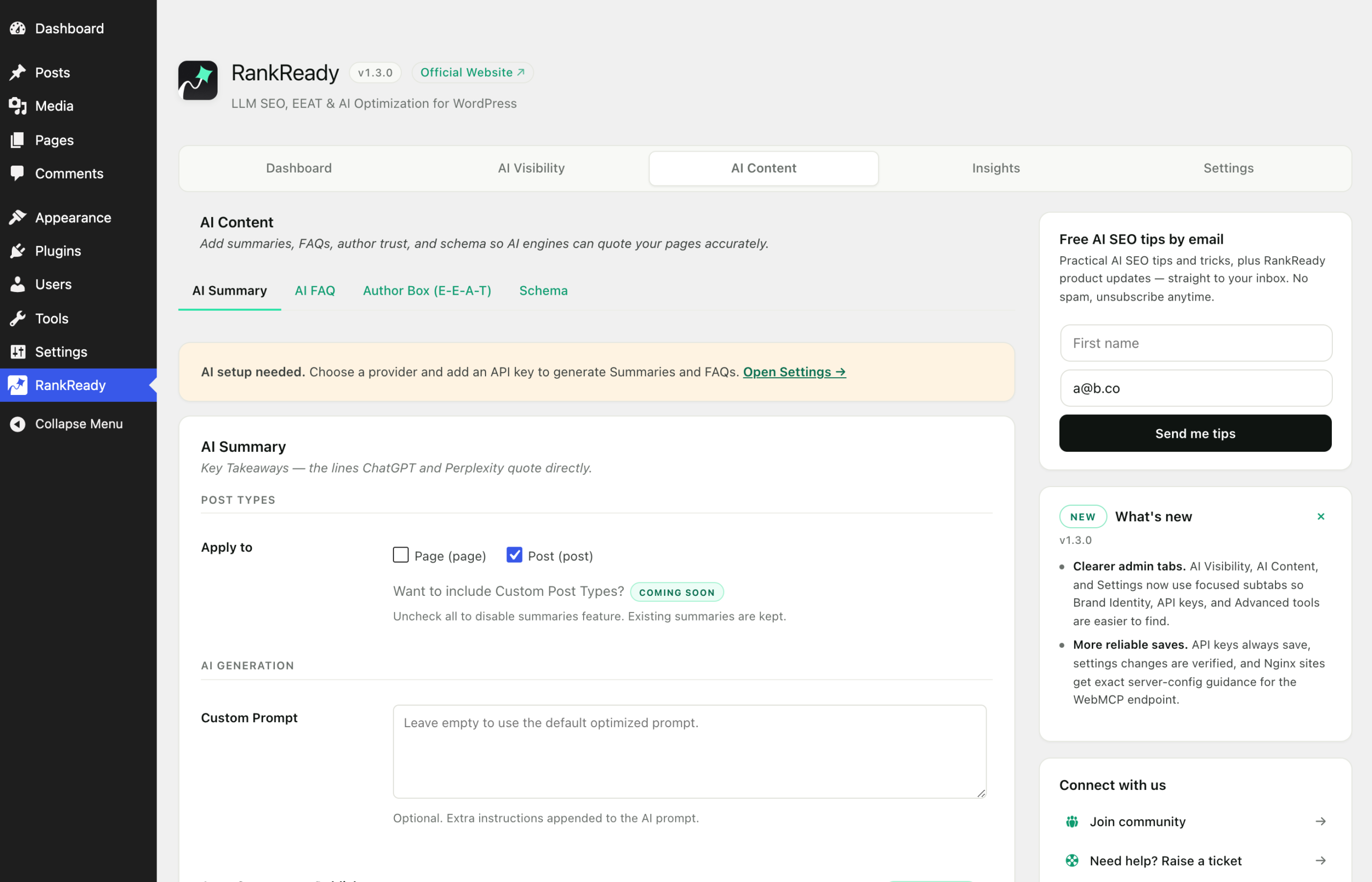
Open RankReady, AI Content (tab=content), then the summary subtab. This is the first step that needs an AI API key. Add one in Settings if you have not: OpenAI, Anthropic Claude, Google Gemini or DeepSeek, your own key, stored in your site’s wp_options and encrypted at rest.
Generate the summary for your post. The summary is stored as post meta in _rnrd_summary, in the shape {"bullets":[...]}.
Generation is unlimited. There is no monthly cap and no per-post allowance. You pay your provider for what you use, and nothing to RankReady.
Step 4: Generate the FAQ
Switch to the faq subtab (sub=faq). The FAQ Generator writes question and answer pairs for the post. They are stored in the _rnrd_faq post meta as a flat array of objects, each with a question and an answer.
DataForSEO is optional here. If you connect it, the generator can pull real People Also Ask questions for your focus keyword instead of inventing question phrasing. It sends the focus keyword only. It never sends your article text.
Generated FAQs feed the FAQPage JSON-LD for that post.
Step 5: Turn on Article schema, in that order
This is the step people get wrong, so read it carefully.
Article schema requires a generated AI summary to exist on that post. RankReady builds the schema description from the summary and returns early when there is none. A post with Article schema switched on but no summary generated emits no Article JSON-LD at all.
So the working order is: generate the summary first, then check the schema. If you toggled schema on before generating, go back and generate the summary, then reload the post and look again.
If Yoast, Rank Math, AIOSEO or SEOPress is active on your site, RankReady merges into their schema graph through their own filters rather than adding a second block. The Article count on the page stays at exactly 1. That is the intended behaviour, not a sign that RankReady failed to output anything.
Step 6: Check the author box
The author box emits Person JSON-LD. It works with no API key. Fill in the author details you want associated with the post, and the Person data follows.
Speakable schema is also available alongside Article and FAQPage.
Step 7: Confirm the post appears in llms.txt
Open /llms.txt and look for your post. That file is the AI-readable index of the site, and /llms-full.txt is the full corpus in one file. If your post is listed, a client that reads the index can find it.
/llms.txt supports ETag and returns 304 on If-None-Match, so repeat fetches of an unchanged file are cheap.
Step 8: Verify what you actually did
Four quick checks on that one post:
/{post-slug}.mdreturns Markdown with frontmatter.- The post is listed in
/llms.txt. - The post page contains Article and FAQPage JSON-LD, and exactly one Article entry.
- The summary and FAQ are visible in the AI Content tab for that post.
What this does and does not achieve
You have made one post easy for a machine to fetch and parse. That is a real, checkable outcome. It is not a promise that any AI system will cite the post, rank it, or send you traffic. When a crawler later shows up in the Insights tab, that hit tells you your page was fetched. It does not tell you it was quoted.
Doing this for the rest of your posts
In the free plugin, generation is per post. Auto-generate on publish and bulk regenerate are both in RankReady Pro, which is the route if you have a large archive to migrate. Work through your most important posts by hand, starting with the pages you would most want a machine to read correctly.