How to generate FAQs from People Also Ask questions
Use DataForSEO to pull real People Also Ask questions into RankReady's FAQ generator, and keep your article text private.
Last updated October 15, 2026
RankReady’s FAQ generator can write questions from the article on its own, or it can start from real People Also Ask questions pulled through DataForSEO. This page covers the second route: how to set it up, what leaves your site, and how to choose which questions to keep.
Two ways to get questions
The FAQ generator always needs an AI provider key, because it writes the answers. DataForSEO is separate and optional. It supplies the questions.
- Without DataForSEO. Your AI provider proposes questions based on the article. Simple, one external service, and the questions reflect the article rather than the search results.
- With DataForSEO. RankReady looks up real People Also Ask questions for your focus keyword and works from those. The questions reflect what people actually type.
What gets sent where
Worth being precise about, because it is the first thing anyone sensible asks:
- To DataForSEO: the focus keyword only. Your article text is never sent to DataForSEO.
- To your AI provider: the content needed to write answers, using the key you pasted into RankReady.
- Stored on your site: the resulting questions and answers, as post meta on that post, as a flat list of pairs.
Both keys sit in your site’s own wp_options table, encrypted at rest.
Step 1: set up your provider and DataForSEO
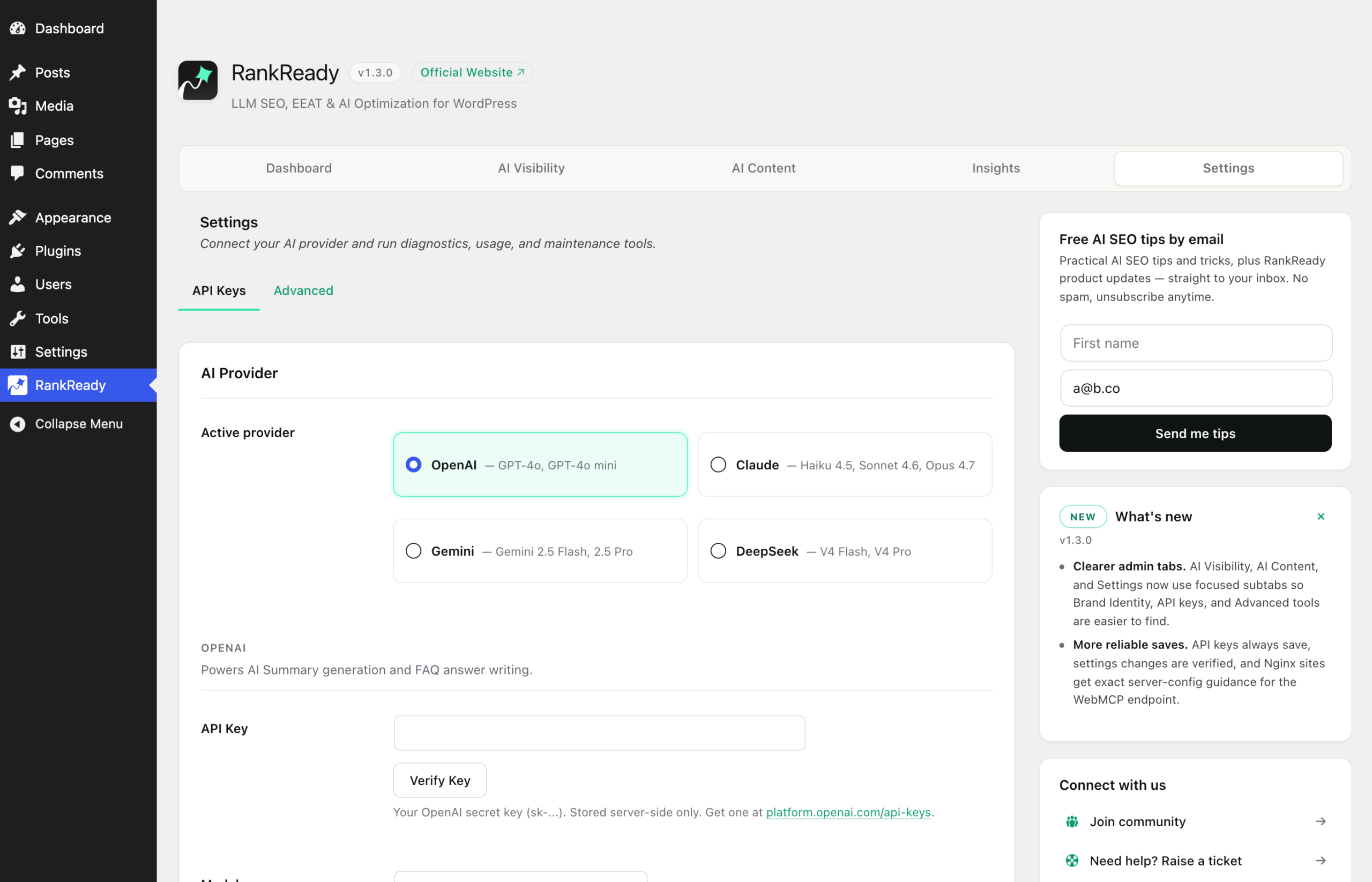
Open the RankReady menu in wp-admin and go to the Settings tab, in the API Keys section. Add a key for OpenAI, Anthropic Claude, Google Gemini or DeepSeek, then add your DataForSEO credentials if you want People Also Ask questions. Generation is unlimited on the RankReady side, with no caps, so the only cost is your own usage with those two services.
Step 2: choose a focus keyword that matches the page
The keyword is the only thing DataForSEO receives, so the questions you get back are only as relevant as that keyword. Use the phrase the page is genuinely about, in the form a person would type it. A keyword that is too broad returns questions your article does not answer, and a keyword nobody searches returns very little.
Step 3: generate the FAQs
Go to the AI Content tab, then the FAQ section, and run the generator for the post.

Step 4: cut hard before you publish
People Also Ask questions come from search results, not from your article, so some of them will be adjacent to your topic rather than part of it. Review the set with three rules:
- Drop any question the article does not answer. If you want to keep it, answer it properly in the article first, then regenerate.
- Merge near-duplicates. Search results often contain three phrasings of one question. Keep the clearest.
- Check every answer against the article. An answer that contradicts the page above it is worse than no FAQ.
Keep answers short and direct. A person scanning the page and a parser reading the markup both benefit from the same thing: the answer in the first sentence.
Step 5: verify the markup
The saved questions and answers are published as FAQPage JSON-LD. Paste the post’s live URL into Google’s Rich Results Test, open Detected items and expand FAQPage. The questions listed should match what you kept. If a deleted question is still showing, purge your page cache and test again.
When Yoast, Rank Math, AIOSEO or SEOPress is active, RankReady merges into that plugin’s schema graph through its documented filters rather than printing a second block. If your SEO plugin also has an FAQ feature and you have used it on the same post, you will be describing the same questions twice from two sources. Pick one per post.
Keeping FAQs current
In the free plugin you regenerate a post’s FAQs yourself after a substantial edit. Bulk regeneration and automatic generation on publish are both in RankReady Pro. Since search results shift over time, it is worth revisiting the FAQs on your most important pages periodically rather than treating them as finished.
What this is and is not
Working from real People Also Ask questions means your page answers questions people are demonstrably asking, in a format machines can parse. That is a content quality decision and a structured data decision. It is not a ranking mechanism, and publishing FAQ markup is not evidence that any AI assistant used your answers. Verify the markup, then keep your claims to that.