How to see which AI crawlers visit your site
Find the record of AI crawler activity on your WordPress site, and set what each of the 29 named crawlers is allowed to do.
Last updated August 25, 2026
RankReady records AI crawler activity on your site and gives you per-crawler rules in robots.txt. This page covers where to look, how to read what you find, and what a crawler hit does and does not prove. No AI provider key is needed for any of it.
Where the data is
Open the RankReady menu in wp-admin and go to the Insights tab. This is where crawler activity and AI referral data are surfaced.

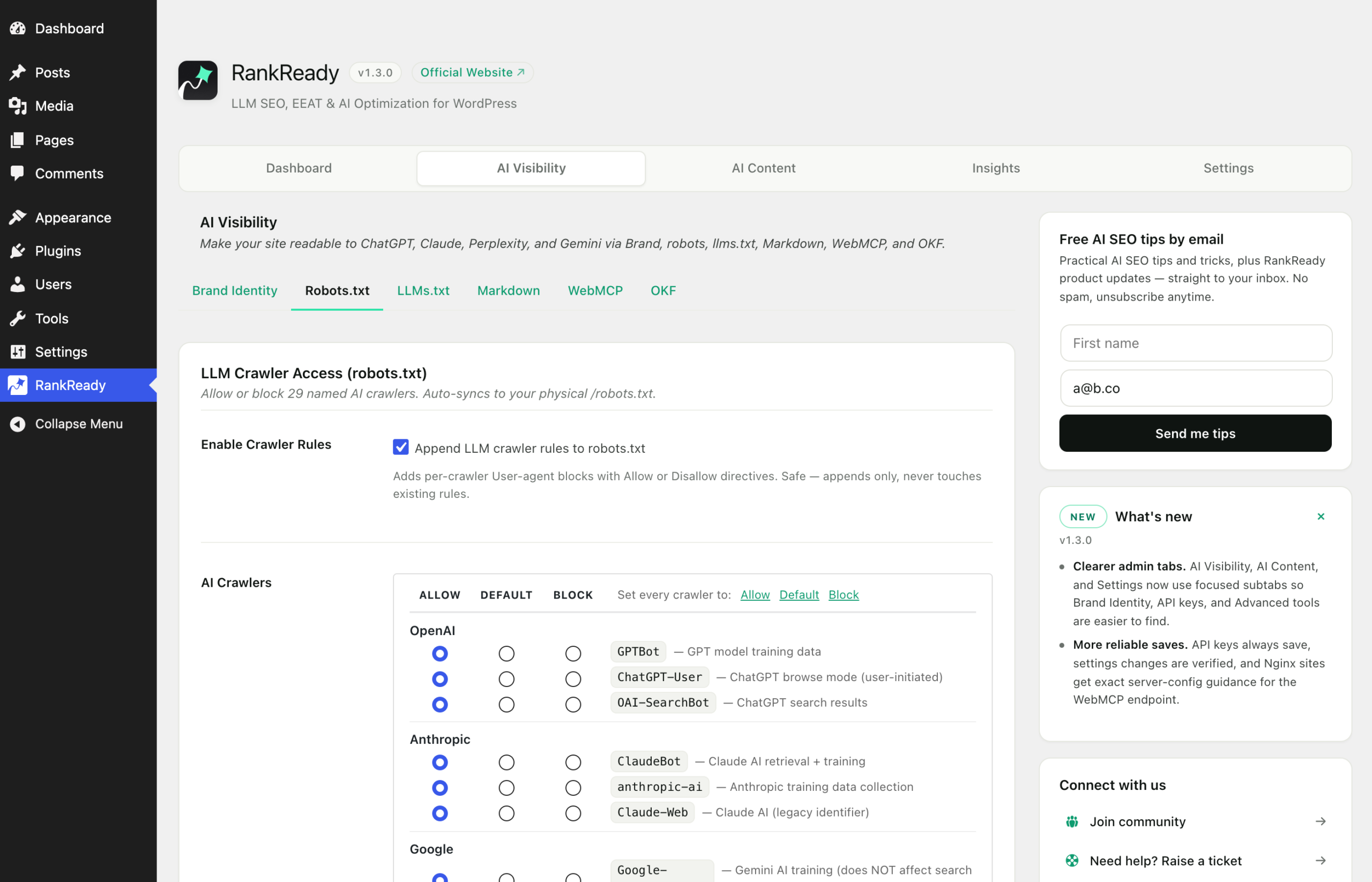
The rules that govern those crawlers live elsewhere: the AI Visibility tab, then the Robots section. One navigation quirk worth knowing is that AI Visibility uses tab=crawlers in the URL rather than tab=visibility.
The 29 named crawlers
RankReady knows 29 named AI crawlers. Named ones include GPTBot, ChatGPT-User, OAI-SearchBot, ClaudeBot, Claude-Web, anthropic-ai, PerplexityBot, Google-Extended, GoogleOther, Applebot-Extended, Bingbot, Meta-ExternalAgent, FacebookBot, MistralAI-User, Bytespider, Amazonbot, cohere-ai, DuckAssistBot, YouBot, PhindBot, CCBot, AI2Bot, Diffbot and PetalBot.
These are different jobs wearing similar names, which is why per-crawler control matters. Some fetch pages to build training corpora. Some fetch a page because a person just asked a question and the product is looking something up. Some are general crawlers whose operator also runs an AI product. Blanket blocking treats all three the same.
How the rules are written
RankReady writes its rules into /robots.txt between # BEGIN RankReady and # END RankReady. Anything outside that block, whether written by your host, your SEO plugin or you, is left alone. Open yoursite.com/robots.txt in a browser after saving and read the block back. That file is the actual output, so it is the thing to check.
You will also see a mirrored group for Googlebot and Facebook’s link crawler that repeats your site’s existing User-agent: * rules. This exists so scanners see those agents named explicitly. Their permissions do not change.
Content Signals
Alongside allow and disallow rules, RankReady supports three Content Signals directives:
ai-train, for using your content to train a modelsearch, for including your content in a search indexai-input, for using your content as input when generating an answer
These let you state different positions for different uses instead of one blunt yes or no. Like the rest of robots.txt, they are a declaration of your preferences. They are honoured by operators who choose to honour them. They are not an access control, and nothing in a plugin can make them one.
Reading the crawler record honestly
This is the part to get right, because it is easy to over-read.
A crawler hit proves your page was fetched. It does not prove your page was quoted in an answer. A record showing GPTBot or PerplexityBot requesting a URL tells you that agent asked your server for that page and your server responded. What happened next, inside a product you do not operate, is not visible from your site and cannot be.
What the record is genuinely good for:
- Confirming your rules work. Block an agent, then watch whether it stops requesting. That is a real, checkable outcome.
- Finding what is being fetched. If the pages being requested are not the ones you care about, that is worth knowing.
- Spotting server-side problems. A crawler receiving errors is a fixable issue that has nothing to do with AI.
- Establishing a baseline. Knowing what normal looks like makes a change meaningful.
What it cannot tell you: whether an answer cited you, how often, or to whom. Anyone selling that certainty from server-side data is overstating it.
Crawler hits are not visitors
Keep two things separate in any report you write:
- A crawler hit is a machine requesting a page.
- An AI referral is a person arriving on your site from an AI product, which RankReady also tracks.
A referral is stronger evidence than a crawl, because a human clicked something. It is still not a count of citations.
If you see nothing at all
- Give it time. A quiet site may go a while between visits from any given agent.
- Check your own rules. If you have disallowed an agent, a well-behaved one will stop fetching. That is the feature working.
- Check what your cache and CDN absorb. A request served entirely at the edge may never reach WordPress, so it cannot be recorded by a WordPress plugin.
- Confirm your endpoints resolve. Load
/llms.txtand a.mdURL yourself. If they 404, re-save your permalinks in Settings, Permalinks.
A sensible starting position
Decide what you actually want, then set it once and check the file. Most publishers land somewhere between blocking training while allowing answer-time fetches, and allowing everything because reach matters more. Both are defensible. What is not defensible is guessing, never reading your own robots.txt, and reporting crawler counts as if they were citations.